.png)





How to Redeem Your Rewards & Claim Your Voucher at The BBQ Store
Easy step-by-step guide to using Voucher Codes, Secret Codes & Rewards Points at checkout
Saving money on your next BBQ, smoker or outdoor cooking gear has never been easier! At The BBQ Store, our Cash Back Rewards program turns your previous purchases into real credit you can spend on future orders. Plus, if you’ve received one of our special $$ digital vouchers, you can claim and use it across multiple orders until the full amount is redeemed.
Whether you’re redeeming standard rewards points or applying your $$ voucher, the process is quick and straightforward. Here’s exactly how to do it during checkout on www.thebbqstore.com.au.
Why Our Cash Back Rewards Program Rocks
Every eligible purchase earns you Cash Back that’s delivered as a Voucher Code + Secret Code via email. Log in to your account and you’ll see your available credit ready to use. It’s our way of saying thank you for shopping with Australia’s favourite BBQ specialists – and yes, you can apply it bit by bit or all at once.
Special $$ Digital Voucher Update:
You can use this voucher multiple times across different orders until the full balance is claimed. Perfect for spreading the savings over a few shopping trips!
Step-by-Step: How to Use Rewards Points, Voucher Codes & Secret Codes at Checkout
- Log into Your Account
Go to www.thebbqstore.com.au and sign in (your username is your email address).
You must be logged in to see and apply your rewards credit.
Forgot your password? Click the “Forgot Password” link – it’s super easy to reset. - Shop & Add Items to Cart
Browse our huge range of BBQs, smokers, accessories, charcoal, and more.
(Note: Some specials and discounted items may be excluded from Cash Back eligibility.) - Proceed to Checkout
At Step 3 of the checkout process, your available Cash Back credit will automatically appear. - Enter Your Voucher Code & Secret Code
Simply type in the Voucher Code and Secret Code (provided in your email or shown below).
For the $$ digital voucher, apply as much or as little as you like – the remaining balance stays in your account for your next order.
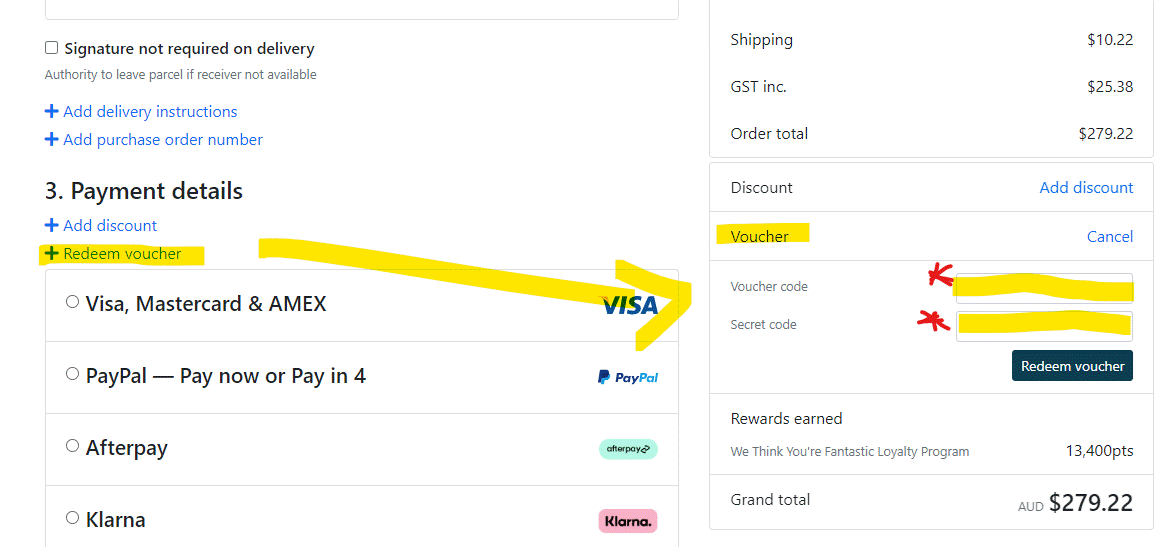
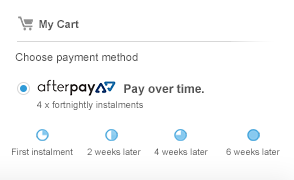
Example of Step 3 checkout screen – enter your codes here and click Apply
5. Complete Your Purchase
Watch the discount apply instantly, then finish checkout.
You’ll also earn fresh Cash Back on this order for your next shop – it keeps going!
Pro Tip: The credit shows automatically once you’re logged in at Step 3 – no extra clicking required in most cases.
Quick Answers to Common Questions
- Can I use the $$ digital voucher more than once? Absolutely – apply it partially or fully across as many orders as needed until it’s all claimed.
- What if the code doesn’t work? Make sure you’re logged in and the items are eligible. Our team can sort it in seconds.
- Do I need to spend a minimum? Most rewards are flexible, so no minimum spend – but just check your specific voucher email for any details.
Got Questions? Talk to the Experts
If anything isn’t clear, or you want help choosing the perfect BBQ setup, our team is here 7 days a week.
We specialise in expert advice on products and cooking tips. Our team are absolute legends in the BBQ world. Whether you’re after the best smoker for low-and-slow or the ultimate grill plate setup, the crew will look after you.
Call: 1300 041 051
Email: sales@thebbqstore.com.au
Happy grilling!